
Over the past year, bot traffic has shifted from something site owners could ignore to something that directly affects how infrastructure behaves. The change isn’t just about volume. It’s about how automated traffic interacts with modern websites, especially WooCommerce stores.
On the surface, it might seem that a request is just a request. But not all requests are equal, and WooCommerce makes that difference even clearer.
In this article, you see why WooCommerce sites are more sensitive to bot traffic, what happens under the hood when bots hit key endpoints, and why common assumptions about traffic and performance don’t hold up in an e-commerce context.
Why WooCommerce turns traffic into workload
On a typical WordPress site, most pages are cached at the edge on a CDN like Cloudflare, so requests are served without engaging the origin server. Even at higher volumes, the cost stays relatively low because the system is optimized to reuse the cached output.
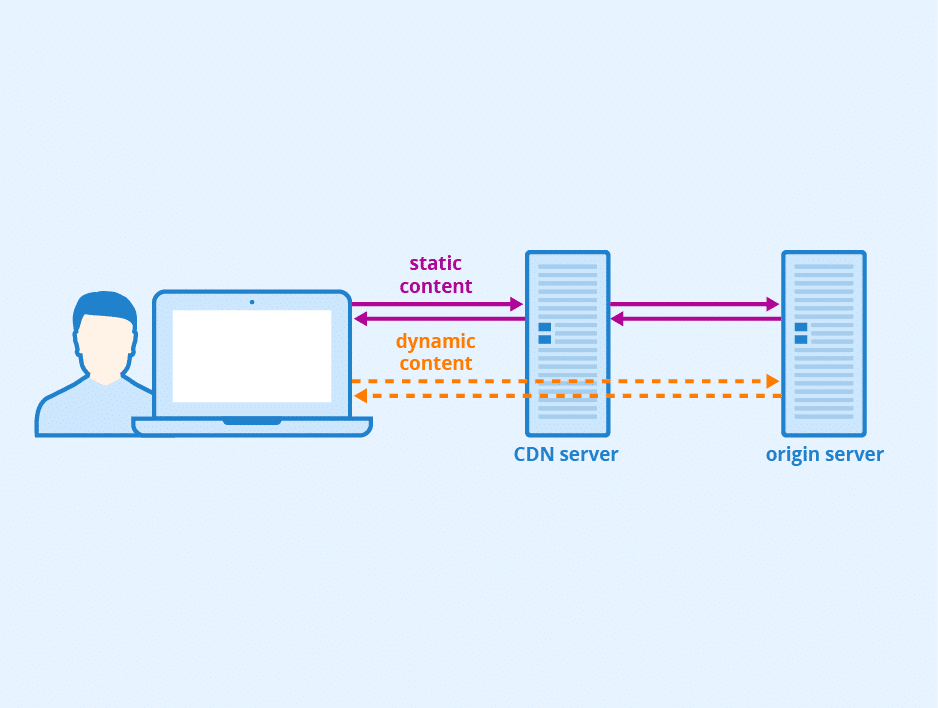
WooCommerce works differently. A large portion of requests depend on real-time data and user-specific context and can’t be served from cache. Every request has to be processed on the origin server from scratch. That includes:
- Executing PHP to handle the request logic
- Querying the database for product, pricing, or session data
- Building the response dynamically before sending it back
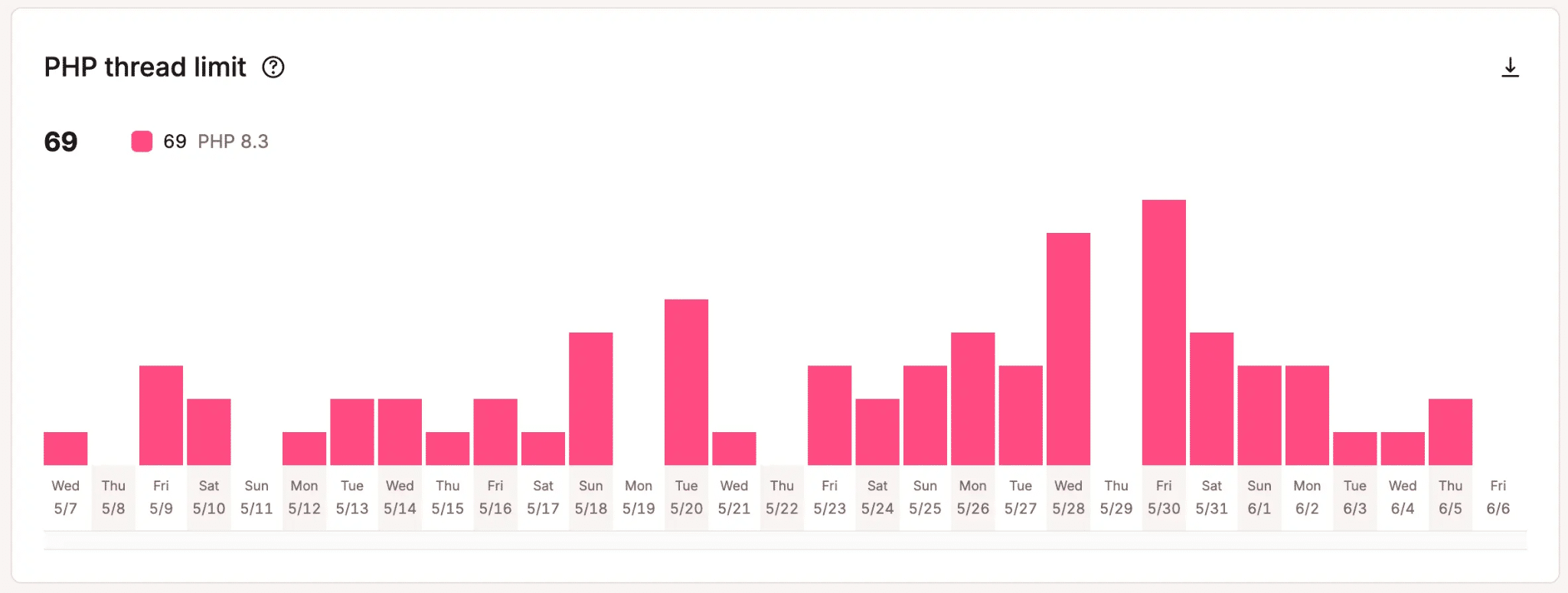
Executing PHP for each request occupies a PHP thread for the duration of the process, and the number of threads available to each site is limited. Once all are in use, new requests have to wait. You might also see your site consistently hitting the PHP thread limit.
At the same time, the database is being queried for data and session information. There’s also session handling happening in the background.
Even before factoring in bot behavior, it’s clear WooCommerce requests are inherently expensive. Once automated traffic enters the picture, that cost compounds.
Where bots cause the most damage on WooCommerce sites
The impact of bot traffic on WooCommerce sites tends to focus on a small set of endpoints designed for real-user interactions.
These are the parts of the site where requests are the most expensive and the least cacheable:
- Cart and checkout endpoints (
/cart,/checkout,?add-to-cart=) - Search queries
- Filtered and parameter-based product pages
- AJAX-driven interactions and dynamic components
Each of these behaves differently, but every request triggers real processing on the server.
Cart and checkout endpoints are the most obvious examples. A request to /cart or anything involving ?add-to-cart= triggers application logic to validate the session, update cart state, query product data, and prepare a specific response. When this happens repeatedly at scale, it quickly consumes server resources.
In our recently published report, “The AI & bot traffic reality check”, our engineering team found that over seven million bot requests hit add-to-cart URLs on the Kinsta infrastructure in 24 hours.
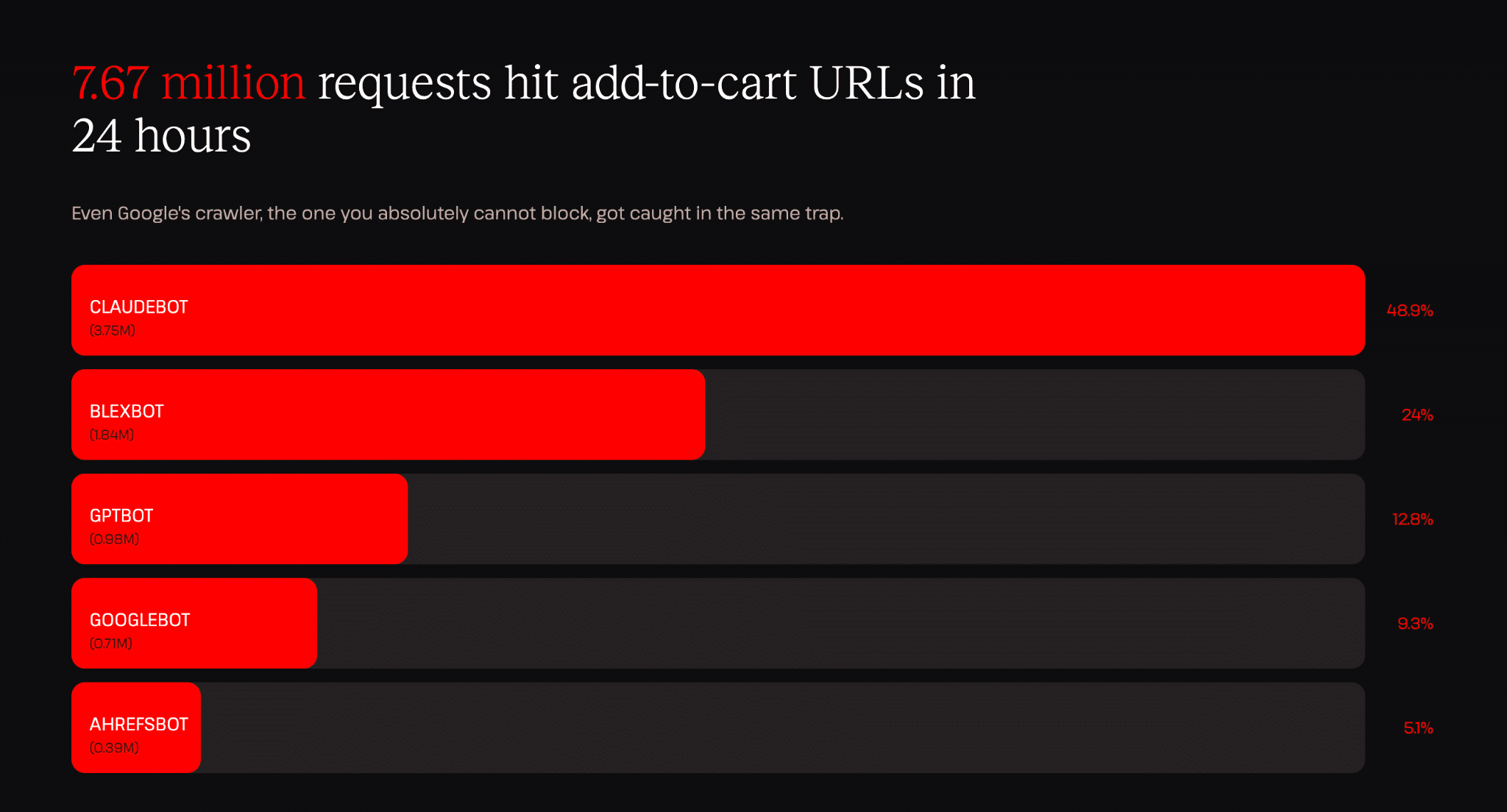
To put the numbers in perspective, 3.75 million requests in 24 hours from ClaudeBot is roughly one request every 23 milliseconds (all day, all night), with each one treated as a new request.
Aside from cart and checkout endpoints, search and filtering also introduce a different kind of pressure. WooCommerce stores often allow users to filter products by attributes like price, category, size, or availability. Each combination creates a slightly different URL, and from a crawler’s perspective, each variation is worth exploring.
In our report, we found that the meta-externalagent (Facebook/Meta AI crawler) was stuck on WooCommerce comparison pages and looping into meaningless variations on calendar pages for days.
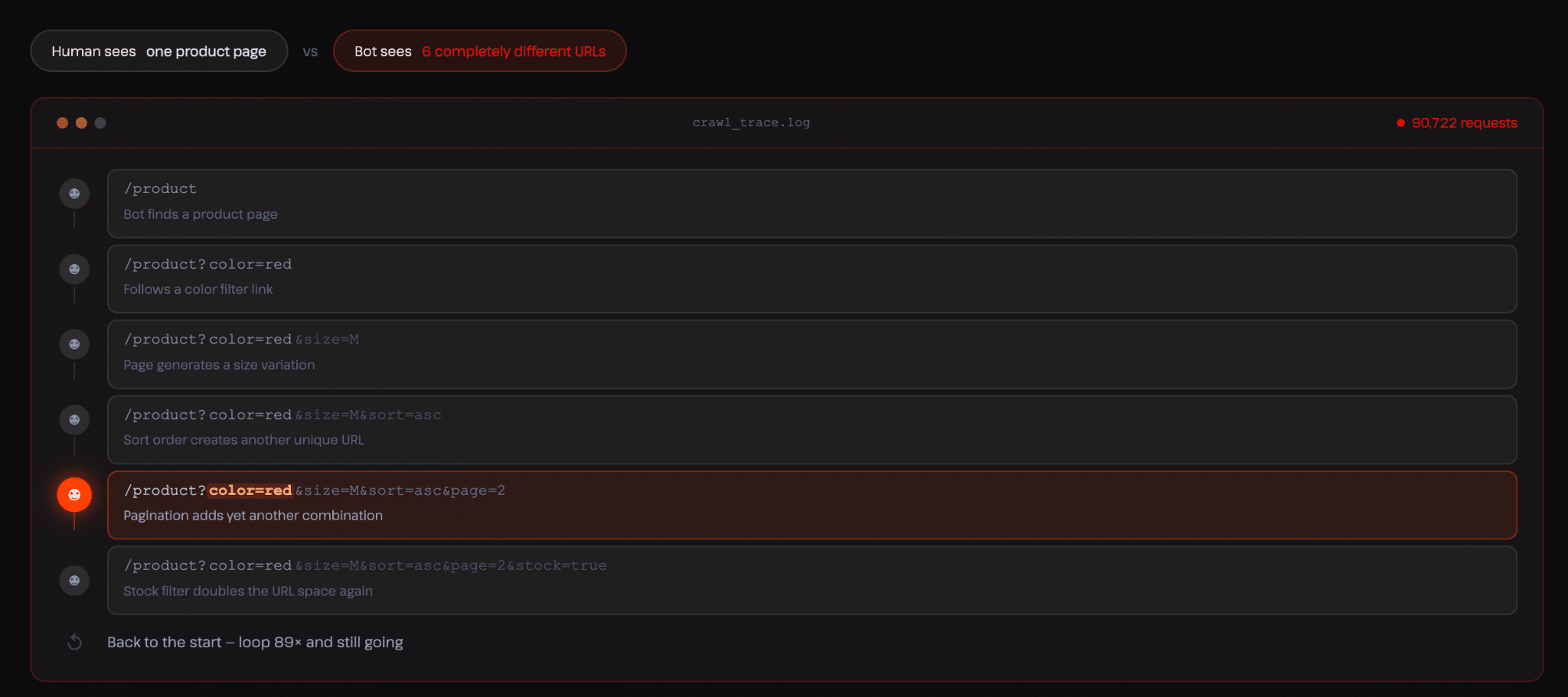
This happens because crawlers don’t understand context. The crawler follows the first variation, then discovers another slightly different version, then another, and continues expanding its path. At no point does it recognize that it’s effectively visiting the same page over and over again.
On WooCommerce sites, this becomes especially problematic because many of these variations are tied to dynamic functionality.
Why bot traffic doesn’t look like an attack (but behaves like one)
One reason this problem is easy to overlook is that it doesn’t resemble a malicious attack.
When a malicious attack occurs, you notice spikes from a single source with clear signs of abuse and possibly malicious payloads, but with bot traffic, the requests look normal because they follow the site structure, access valid URLs, and receive valid responses.
From the outside, it often looks like legitimate crawling activity, but the system doesn’t evaluate intent. It only processes requests.
When inefficient or poorly behaved crawlers operate at scale, they create patterns that look similar to abuse, even if that wasn’t the original goal. Repeated requests, loops, and high-frequency access to dynamic endpoints all translate into sustained server workload.
This is why the distinction between “good” and “bad” bots becomes less useful in practice.
A crawler can be legitimate and still generate traffic patterns that degrade performance. The issue isn’t just who is making the request, but what that request forces the system to do.
What this means for WooCommerce performance
When this kind of traffic grows, the effects show up in ways that are easy to misattribute.
- Pages start loading more slowly, especially during peak activity
- Checkout flows feel delayed or inconsistent
- In some cases, requests begin to queue as PHP workers are tied up handling repeated automated interactions
From the outside, it looks like a performance issue, but the underlying cause is often sustained pressure from automated traffic hitting uncached endpoints.
This also affects how traffic is interpreted. Large volumes of automated requests can inflate visit counts without contributing to actual user activity. A spike in traffic may not correspond to an increase in engagement, conversions, or revenue. Without visibility into what’s generating that traffic, it becomes difficult to separate real demand from automated load.
At scale, this becomes both a performance and a decision problem.
Why blocking bots isn’t a complete solution
If you are not yet conversant with bot traffic, your natural reaction to this kind of behavior is to block it. In some cases, that works. But in most cases, it creates new trade-offs.
The truth is not all automated traffic is harmful. Search engine crawlers are essential for visibility. AI crawlers play a role in how content is surfaced across AI agents, which is now referred to as GEO & AEO practices.
Blocking everything removes the traffic problem, but it also removes the benefits. Allowing everything avoids disruption, but it leaves the system exposed to unnecessary load.
The challenge is that WooCommerce sites don’t need a single rule for all traffic. They need different behavior depending on where the request is going and the source of the traffic.
A more practical way to think about bot traffic
Instead of asking whether bots should be allowed or blocked, the more useful question is: Which types of traffic should be allowed to access which parts of the site?
Cart and checkout endpoints don’t need to be accessed by crawlers at all. Search and filtered pages can be limited without affecting core functionality. At the same time, product and category pages need to remain accessible to search engines.
This kind of separation is what makes bot traffic manageable.
In our analysis of more than 10 billion requests across Kinsta-managed infrastructure, these patterns appear as recurring behaviors on real WooCommerce sites. If you want to explore the full dataset and see how these patterns evolve across different site types, the AI bot traffic report provides more detail.
At the same time, managing this manually is rarely practical. It requires adjustments from time to time, clear visibility into traffic patterns, and a way to apply decisions without breaking legitimate usage. This is exactly the gap Kinsta’s bot protection tool is designed to solve, giving site owners the ability to control how different types of traffic are handled without relying on one-size-fits-all rules.
Feel free to check out our docs and contact support if you need more clarification on how this can work for your site or agency.